Since VarAC's VARA mode is not yet accepted as ADIF mode and not yet featured in PSKreporter it is difficult to display a map with stations. Somebody found out an experimental workaround using software called Pinpoint. Pinpoint is an APRS application that is capable of much more as APRS. Features and download can be found here: https://www.pinpointaprs.com/
The fun is that Pinpoint can make use of the VARA-HF TNC and VarAC CAT/PTT control connecting it via a KISS network port. The only problem is that so far I couldn't find a real good instruction on how to set it up to work well with VarAC. Everyone is pointing to this german language instruction, but it only gives a very brief explanation on how you should set things up. Luckely some stations in the VARA HF facebook group got it working and I was quickly helped answering my questions. To help others and fo myself I noted some of the things I did to get it working.
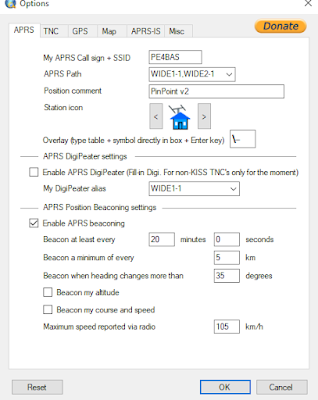
If you want to experiment just download the pinpoint software and install it on your computer. First of all you need to fill in your callsign and location. A SSID is not needed. Setup your location: search for you QTH on the map. Press CTRL+SHIFT+left mouse button. There will be a popup were your can choose between "set as my position" or "add waypoint".
Station icon can be set to your preference. In my case I transmit a beacon every 20 minutes. Of course you're free to fill in your own.
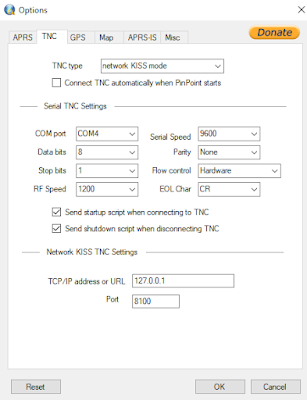
Next the TNC tab to setup your connection with the VARA-HF and VarAC modem. I assume you have VarAC working without problems inclusing CAT/PTT control from within the program.
Choose "network KISS mode" as TNC type. Don't connect TNC automatically. I've tried to set the automatic TNC connection described in the german language instruction but it doesn't work here. You can always connect manually, I show it later. Leave the "serial TNC settings" as it is, it is not needed to work with VarAC. Network KISS TNC settings, assure yourself that the port is 8100. That port should be the same in VARA-HF. The VARA-HF configuration should be like this:
Be shure "KISS interface" is on and KISS port is 8100.
Next the GPS tab. You can use a GPS device. You can also pinpoint your location on the map.
If everything is right and you setup your QTH the initial position is showed in this tab.
The map tab. I think this is obvious. You can choose anything you like to have displayed on the map.
Next the APRS-IS tab.
I'm not shure if you need to be connected to the internet APRS gate. An APRS-IS passcode can be found here. But, if so, it is important you set the "Receive Range Filter" to "0". Otherwise you will see all kind of local stations on the map. What we want is only to view the stations using VarAC or VARA.
Next tab Misc.
Of course you can set this up as you like. Since there are not many yet that use pinpoint I set this up to view stations on the map received for 24h (1440 minutes).
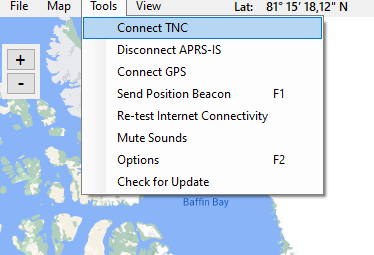
When everything is setup you can connect the TNC modem in VarAC to use it for PTT. When connected you choose "Send position Beacon" to test and you radio should transmit the beacon. After that you will transmit a beacon every 20 minutes (if you set 20 minutes in the APRS tab)
Well I hope that some more VarAC users will use pinpoint experimentally. Till now I only see few stations that are running pinpoint or other APRS software.
It should look like this after a few hours of monitoring on 40 and 20m.
Have fun experimenting...